We need to regulate AI.
We mean it enough to put money on it. When FlowDot earns revenue, ten percent of what is left after costs goes to funding the work of regulating AI, reported every quarter. And we built the product so you keep a hard stop on every agent you run.
Real automation, without taking your hands off the wheel.
FlowDot runs agents and long jobs on the models you pick, across every device you own. Nothing consequential happens until you approve it, and one button stops everything from anywhere.
One agent. Everywhere you work.
The same automations, with verifiable human control, on any model you choose.

Start a job anywhere. Pick it up everywhere.
Run the same agent from the web, your desktop, your phone, the command line, a VR headset, voice, or any MCP client. A local daemon keeps your chats, loops, and progress identical across all of them.
- One account and one agent across seven surfaces.
- A job started on your laptop is visible from your phone.
- Resume any conversation from where you left off.

Verifiable human control, on every run.
Every consequential action passes through your permission gate first. You see which provider, model, and tools handled each step as it happens, replay any run after the fact, and stop all work from any device, even your phone.
- Per-tool permission gate with five approval scopes.
- Real-time visibility and a complete audit trail.
- A panic stop that halts every run, everywhere.

You choose the model. Swap anytime.
You pick a tier, Simple, Capable, or Complex, and map each one to any provider you want. Plug in your own keys, route through your local Ollama or your ChatGPT subscription, or use the Bedrock aggregator. The same recipe fits anyone's budget.
- Your keys, encrypted, never tied to a vendor.
- Mid-recipe model swaps are first-class.
- Local and private routes the server never sees.
How FlowDot Works.
The technical architecture behind the platform.
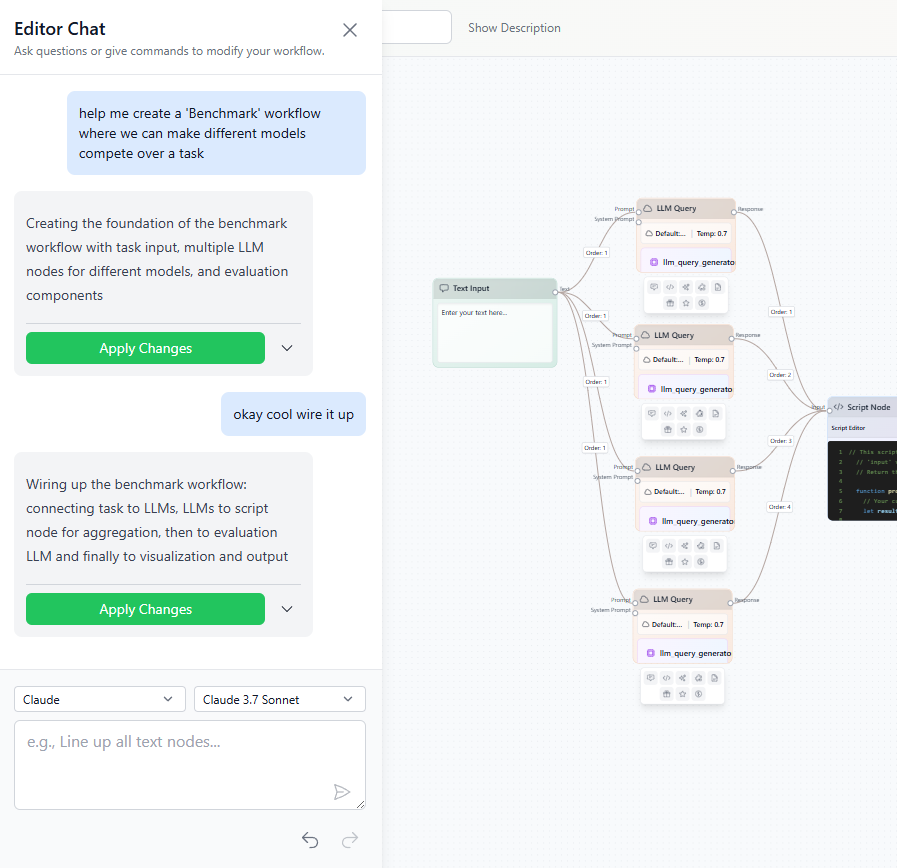
The Brain: Visual Builder
Compose complex AI logic using our drag-and-drop node editor. Your visual workflows are translated into execution graphs that run on our Node.js engine.
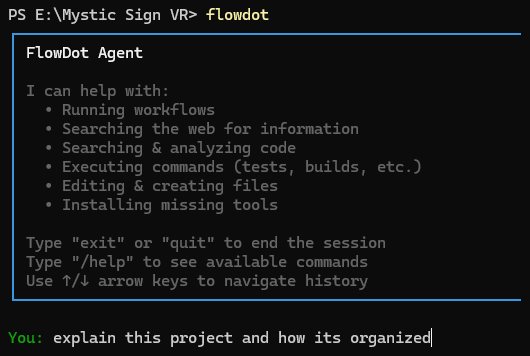
The Hands: Local CLI
Run agentic "recipes" that interact directly with your local files and git repositories. Sandboxed, with explicit permissions and zero-trust defaults.
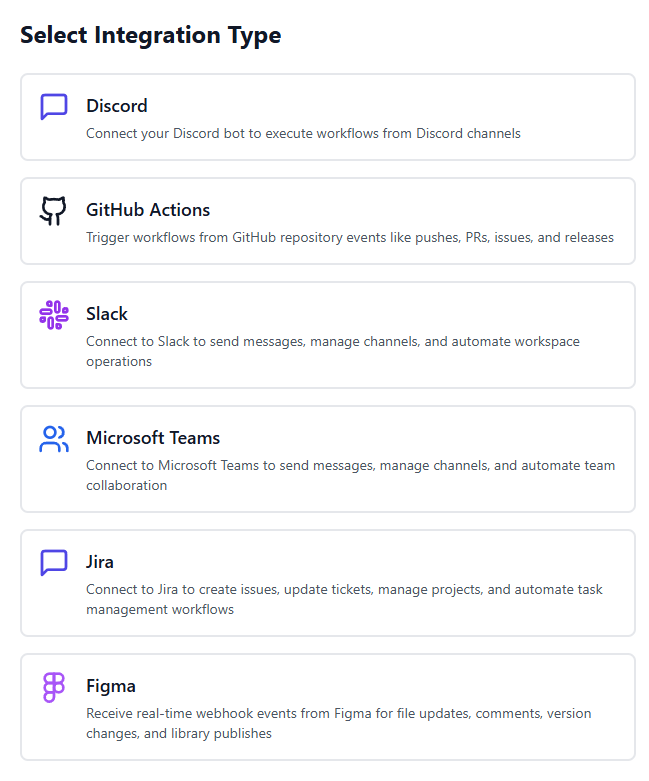
The Reach: Omni-Channel
Connect your workflows to the tools you use every day. Wire into Slack, Discord, Telegram, and Signal for notifications and remote command execution.
Local CLI
FlowDot Hub
Telegram / Discord
The Link: COMMS Relay
Our bidirectional relay system lets you control your local CLI from your favorite messaging app. Walk away from your desk, continue the conversation, and approve sensitive actions from your phone.
Built for your industry.
Most of it runs on toolkits, the reusable connectors that let one agent reach every system you use.
Trade and research with a hand on the kill switch.
Build recipes that pull market news, fan out across your watchlists, and place orders through your own broker toolkit. A human approval gate sits in front of every trade, and the panic stop is reachable from your phone.
Approval before every order
A gate step holds each trade until you approve it.
Full audit trail
Replay every news pull, tool call, and order after the fact.
Your broker and news keys
Wire in your own market data, news, and broker APIs as toolkits.

Agents that work inside your stack, not around it.
Expose your workflows to Claude Desktop, Cursor, or any MCP client, then run local recipes that read your codebase and touch git. Every consequential call asks permission first, with a scope you choose.
MCP server
Drive FlowDot from any MCP client your team already runs.
Local recipes
Run agent tasks against your files and git, sandboxed.
Per-tool permissions
Each call prompts once, with five approval scopes.

From a stack of PDFs to cited answers.
Upload documents to a private knowledge base, search them semantically inside any agent or recipe, and run agentic loops that pull from your own web search keys and chart what they find.
Private RAG
Upload PDFs and docs, then query them from any step.
Your own web search
Route research through your Serper, Brave, or Bing key.
Built-in data visualization
Turn results into charts with a dedicated node.

Automation your compliance team can sign off on.
Every action is gated, logged, and reversible. Approve sensitive steps from Telegram while you are away, replay any run end to end, and stop everything at once. Credentials are never stored in plaintext.
Human in the loop
Approve or deny each sensitive step, even remotely.
Comprehensive audit
Drill into every tool call and model round trip.
Encrypted credentials
Keys are never plaintext at rest or in transit.

Run campaigns and ads across every platform.
Manage ad campaigns across Google Ads, Meta, X, and LinkedIn from one agent through installable toolkits, generate audience-specific content, and post to Slack, Discord, and Reddit. Watch news and social signals, then put the whole thing on a schedule.
Cross-platform ad toolkits
Manage Google Ads, Meta, X, and LinkedIn from one agent.
Persona content
Switch models and prompts for each audience.
Trend monitoring
Pull news and social signals into your workflows.

One agent. Every connector.
A toolkit is a reusable bundle of API actions. Install one the community already built, or wire your own and contribute it back. No fees and nothing to sell, just a shared library that keeps growing.
- Install in a click. Add a connector with OAuth or an API key, encrypted at rest.
- Copy and fork. Start from a community toolkit and adapt it to your stack.
- Build and contribute. Author your own tools and share them with everyone.
- Use everywhere. The same toolkit works from chat, recipes, voice, and your IDE.
Everything you need to work with AI.
Chat, build, automate, and ship. All in one platform.
AI Chat with Memory
Chat with AI that remembers your preferences across conversations. Attach images, trigger workflows, and get suggestions in line.
AI-Generated Apps
Describe what you want and get a working React app. Live preview, full code editor, and the ability to connect your workflows as backends.
Knowledge Base
Upload your documents, PDFs, and notes. Search them semantically from chat, recipes, or any workflow node.
Connect Your Tools
Slack, Discord, Teams, GitHub, Figma, Jira, Trello. Trigger workflows from events or chat directly with AI in your favorite apps.
Agent Toolkits
Bundle API integrations into reusable toolkits. Secure credential management with OAuth support. Share with the community or keep private.
Scheduled Automation
Set your workflows to run automatically on a schedule. Daily reports, weekly summaries, or any recurring task.
The FlowDot Ecosystem.
One platform, every surface. Trigger workflows in the cloud or securely command your Local CLI via Telegram, Discord, or Signal.
Web Dashboard
Visual workflow builder
Local CLI
Agentic recipes on your machine
MCP Server
Claude Desktop integration
Telegram / Discord / Signal
Remote command & approval
Hub
Laravel Hub
Auth, billing, orchestration
Node Execution Layer
Workflow runtime engine
Encrypted Cloud Storage
Your data, locked down
Your models. Your choice.
Use FlowDot credits for convenience, or bring your own API keys for complete control.
Fast & Cost-Effective
Quick tasks, summaries, and simple transformations at minimal cost.
Balanced Performance
Most tasks: analysis, writing, coding, and complex reasoning.
Maximum Capability
Research, deep analysis, and tasks that need a frontier model.
30+ LLM providers via BYOK, Ollama for local-only AI, and audio providers for TTS and STT.
Full platform access from your AI tools.
Our MCP server exposes the entire FlowDot platform to Claude Desktop, Cursor, Claude Code, and any MCP-compatible client. Build, execute, and manage workflows without leaving your environment.
Built by a community.
Share workflows, apps, custom nodes, and recipes. Learn from others and contribute your own creations.
Public Workflows
Browse and fork workflows created by others
App Gallery
Discover apps you can use or clone
Custom Nodes
Share JavaScript components with the community
Voting & Comments
Vote and comment to surface the best work
Ready to put AI to work?
Sign up free, bring your own keys, and start shipping.